
AgentsAutonomy & tool use
OpenAI's ChatGPT Chrome extension can now read and act in users' open tabs
Two months after shutting down its Atlas browser, OpenAI updated its ChatGPT extension for Chrome. The assistant can now read open tabs, fill forms, send messages and group tabs inside logged-in sessions, bringing Atlas-style agent features into a rival's browser.
From the The Verge · AI article of October 15, 2026 and cited sources: The October 15 update splits the extension into two modes. [1] [2] [6] [7]
SOURCES[1] ChatGPT can peek at your Chrome tabs now theverge.com[2] Unite.AI: OpenAI Brings Computer Use to Chrome With… unite.ai[6] tbreak: ChatGPT's Chrome extension can now read your open… tbreak.com
 AT Pulse research deskPublished · Updated · 5 min read · AI-assisted analysis
AI-assisted, not human-edited. Methodology Corrections Who owns this site
- Original source
- The Verge · AI article, independent perspective
- Brief by
- AT Pulse research desk AI-assisted; publisher and contact on the desk page
- When
- October 15, 2026 article published
- Covered
- Oct 16 edition
- Evidence
- 9 sources across 9 sites
- 1ChatGPT can peek at your Chrome tabs nowtheverge.com
- 2Unite.AI: OpenAI Brings Computer Use to Chrome With…unite.ai
- 39to5Mac: OpenAI is discontinuing ChatGPT Atlas9to5mac.com
- 4TechInformed: OpenAI hardens ChatGPT Atlas against prompt…techinformed.com
- 59to5Google: Chrome Gemini auto browse9to5google.com
- 6tbreak: ChatGPT's Chrome extension can now read your open…tbreak.com
RisingHow it’s measured
Hacker News · 5 likes · 2 comments
Reach blends public engagement (views, likes, comments, shares, stars) from the platforms where the story or its original source lives: YouTube, Hacker News, GitHub, Substack and similar. A video and the article written from its transcript share one score, taken from the video. Platforms with no data are left out rather than counted as zero, and the age of a story never lowers its score.
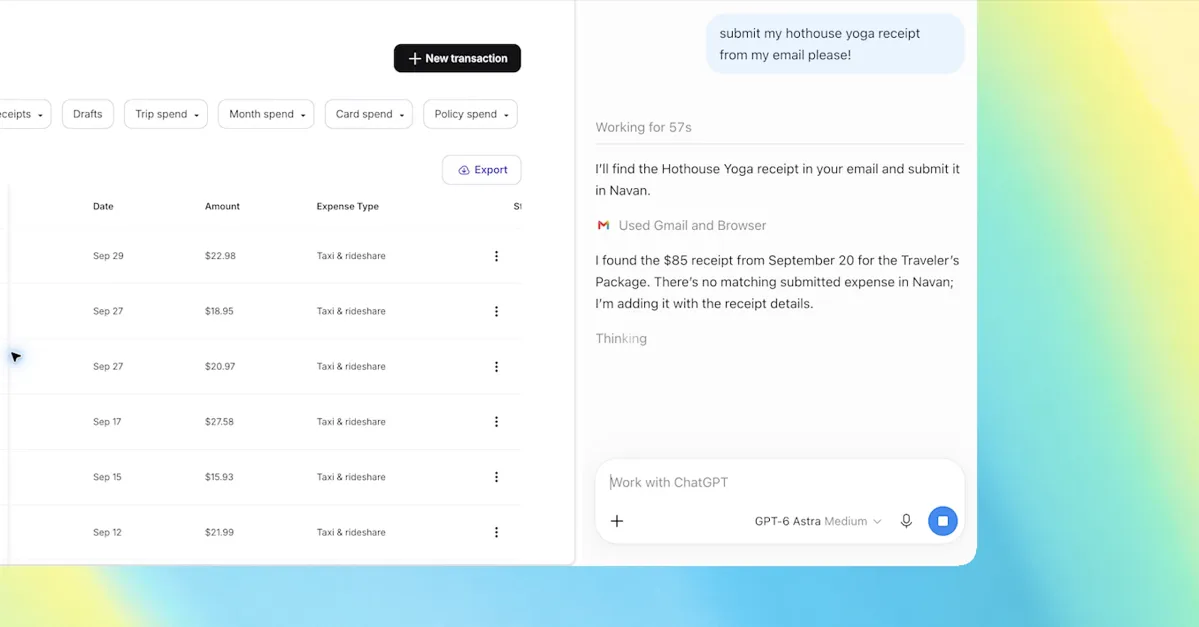
The October 15 update splits the extension into two modes. Chat mode reads open tabs to answer questions, such as comparing prices across shops. Work mode acts inside them: it sends messages, fills out forms, downloads files and groups tabs, all using sessions where the user is already signed in. The extension has about 7 million users and also runs in Edge, Brave, Opera and Vivaldi. [1] [2] [6] [7]
The release follows OpenAI's decision to close its standalone Atlas browser on August 9 and move its features into the ChatGPT desktop app and the extension. That puts OpenAI's agent inside Chrome, where Google's Gemini auto browse already runs with stricter limits: manual approval for purchases and social posts, and daily caps on agent actions. [2] [3] [5]
Users choose permissions site by site: allow once, allow that site, allow all sites, or decline. Domain allowlists and blocklists are also available. OpenAI's documentation flags 'allow all sites' and browser-history access as elevated risk. It also says browser activity is stored only when it becomes part of the chat, so there is no separate complete record of what the agent did. Because the agent can now act, a poisoned page can lead to real actions, not just a bad answer. [7] [8] [9]
The documented change is scope: an agent using existing cookies and logins can reach email, CRM and internal tools.
Read the full assessment
The implication is that IT teams likely need extension policies, domain blocklists and their own logging, since no complete action log exists.
Sources are gathered; writing the dossier now.
Executive brief
OpenAI shut down its own Atlas browser in August 2026. Two months later it moved Atlas's agent features into Google's browser instead. On October 15, 2026, the ChatGPT extension for Chrome gained the ability to read a user's open tabs, act inside them, and organize them. The extension has about 7 million users (Unite.AI). When a user tags Chrome, ChatGPT can compare products across tabs, fill out forms or send messages, all inside sessions where the user is already logged in (The Verge). This puts more of a user's real accounts within reach of an agent, and OpenAI has said its own defenses against prompt injection will not stop every attack.
What changed and event timeline
Atlas launches
OpenAI released ChatGPT Atlas, a standalone browser for Mac with an Agent Mode. It later fed its features into a combined ChatGPT desktop app ().
Atlas hardened against prompt injection
OpenAI described an AI "attacker" model trained with reinforcement learning to find injection paths, and said guarantees are "challenging" ().
Google ships auto browse
Chrome's "auto browse," powered by Gemini 3, became available to US desktop subscribers of AI Pro and Ultra. Purchases and social posts require manual approval, and agent actions have daily limits ().
Atlas sunset announced
OpenAI said Atlas would close on August 9. Its capabilities moved into the ChatGPT desktop app and a Chrome extension for people who don't want to switch browsers (;).
The extension gains tab access and control
ChatGPT can now read tabs in Chat mode and control them in Work mode. The sidebar now carries the user's full conversation history (;).
Capabilities and access
- Model: no underlying model is named in the reviewed sources. Unite.AI reports extension version 1.26.1005.11759, updated October 15 (Unite.AI).
- Chat mode: reads open tabs to answer questions, for example comparing prices across shops.
- Work mode: sends messages, fills out forms, downloads files, and groups tabs.
Read the full section
- Model: no underlying model is named in the reviewed sources. Unite.AI reports extension version 1.26.1005.11759, updated October 15 (Unite.AI).
- Chat mode: reads open tabs to answer questions, for example comparing prices across shops.
- Work mode: sends messages, fills out forms, downloads files, and groups tabs.
- Other features: mentioning a tab as context, highlighting page text, a right-click "Ask ChatGPT" option, and analysis of YouTube transcripts.
- Access: reported as available on all ChatGPT plans. It works in Chrome, Edge, Brave, Opera and Vivaldi; Opera has no side chat (OpenAI docs).
Technical analysis for researchers and developers
- How it works: the agent runs inside the user's real browser session, using its cookies and login tokens.
- Permissions: for each site, the user can allow once, allow that site, allow all sites, or decline. Domain allowlists and blocklists are available.
- Logging: browser activity is stored only when it becomes part of the chat (text, screenshots, tool calls or summaries).
Read the full section
- How it works: the agent runs inside the user's real browser session, using its cookies and login tokens. Setup requires updating both the browser extension and the desktop app, then switching on Settings > Computer Use (OpenAI docs).
- Permissions: for each site, the user can allow once, allow that site, allow all sites, or decline. Domain allowlists and blocklists are available. OpenAI flags "allow all sites" and browser-history access as elevated risk.
- Logging: browser activity is stored only when it becomes part of the chat (text, screenshots, tool calls or summaries). There is no separate complete action log, which matters for anyone auditing what the agent did.
- Evaluation: no benchmark or evaluation method has been published for this release.
Claims and evidence
- Tab reading, tab control and the example tasks: these come from OpenAI's own announcement and demo, as relayed by The Verge.
- 7 million users and the version number: taken from the Chrome Web Store listing, as reported by Unite.AI.
- Availability on all plans: reported by Unite.AI. The reviewed OpenAI documentation does not specify which plans get it.
Read the full section
- Tab reading, tab control and the example tasks: these come from OpenAI's own announcement and demo, as relayed by The Verge. No reliability data was published alongside them.
- 7 million users and the version number: taken from the Chrome Web Store listing, as reported by Unite.AI.
- Availability on all plans: reported by Unite.AI. The reviewed OpenAI documentation does not specify which plans get it.
- Independent testing: none of task success or resistance to injection was found. tbreak explicitly notes there was none (tbreak).
Context and prior work
- Google's Gemini auto browse already offered agentic browsing inside Chrome itself, with stricter limits: manual approval for purchases and posts, plus daily action caps (9to5Google).
- Atlas's agent features are now spread across the desktop app, Codex and this extension (9to5Mac).
- Security researchers at LayerX showed a "Man-in-the-Prompt" attack: browser extensions with no special permissions could inject prompts into ChatGPT and Gemini (Dark Reading).
Read the full section
- Google's Gemini auto browse already offered agentic browsing inside Chrome itself, with stricter limits: manual approval for purchases and posts, plus daily action caps (9to5Google).
- Atlas's agent features are now spread across the desktop app, Codex and this extension (9to5Mac).
- Security researchers at LayerX showed a "Man-in-the-Prompt" attack: browser extensions with no special permissions could inject prompts into ChatGPT and Gemini (Dark Reading).
Limitations, safety and contested findings
- OpenAI has said its prompt-injection safeguards "will not stop every attack" (TechInformed).
- The documentation tells users to treat page content as untrusted and not to send secrets through browser tasks (OpenAI docs; Unite.AI).
- Moving from read-only access to an agent that acts sharply increases exposure, because a poisoned page can then lead to actions rather than just a bad answer (Elena's AI Blog).
Read the full section
- OpenAI has said its prompt-injection safeguards "will not stop every attack" (TechInformed). In a red-team example, a planted email caused an agent to draft a resignation note until the defenses flagged it.
- The documentation tells users to treat page content as untrusted and not to send secrets through browser tasks (OpenAI docs; Unite.AI).
- Moving from read-only access to an agent that acts sharply increases exposure, because a poisoned page can then lead to actions rather than just a bad answer (Elena's AI Blog).
Business and practitioner implications
- Enterprise IT: the extension can reach every service a logged-in session can, including email, Salesforce and internal tools.
- Auditing: because there is no complete action log, compliance teams may need their own logging at the browser or proxy level.
- Users: check form entries before submitting, and close banking, health and admin tabs during agent tasks (tbreak).
Read the full section
- Enterprise IT: the extension can reach every service a logged-in session can, including email, Salesforce and internal tools. Policy controls are needed for extension installs, the "allow all sites" option and domain blocklists.
- Auditing: because there is no complete action log, compliance teams may need their own logging at the browser or proxy level.
- Users: check form entries before submitting, and close banking, health and admin tabs during agent tasks (tbreak).
- Strategy: OpenAI now reaches users through Chrome, the browser of Google, a competitor that sells its own agent.
The source trail.
Sources (9)
ChatGPT can peek at your Chrome tabs now
Article text retrieved; extracted text may omit tables or interactive elements.
theverge.com