
CodingSoftware & developer tools
Google's Create My Widget for Android mostly produces templates and Gemini shortcuts in The Verge's hands-on test
Google's Gemini-powered Create My Widget, pitched as vibe coding for Android home screens, is now in beta on recent Pixels. In The Verge's testing it mostly made countdowns, score tiles, Search snippets and Gemini shortcuts, and it struggled with live data like bus arrivals.
From the The Verge · AI article of November 27, 2026 and cited sources: The Verge tested the feature on a Pixel 11 Pro. [1]
SOURCES[1] Android’s DIY widgets are a bit of vibe-coding fun theverge.com
 AT Pulse research deskPublished · Updated · 5 min read · AI-assisted analysis
AI-assisted, not human-edited. Methodology Corrections Who owns this site
- What happened
- The Verge tested the feature on a Pixel 11 Pro. [1]
- Original source
- The Verge · AI article, independent perspective
- Brief by
- AT Pulse research desk AI-assisted; publisher and contact on the desk page
- When
- November 27, 2026 article published
- Covered
- Nov 28 edition
- Evidence
- 8 sources across 8 sites
- 1Android’s DIY widgets are a bit of vibe-coding funtheverge.com
- 2Linked video: Android’s DIY widgets are a bit of…youtube.com
- 3TechCrunch: Google brings agentic AI and vibe-coded…techcrunch.com
- 4Android Developers Blog: Building for the Intelligence…developer.android.com
- 5Google blog: Gemini Intelligence, new features on more…blog.google
- 6Digital Trends: Google opens early beta access to Create…digitaltrends.com
RisingHow it’s measured
YouTube video · 1.8K views · 14 likes
Reach blends public engagement (views, likes, comments, shares, stars) from the platforms where the story or its original source lives: YouTube, Hacker News, GitHub, Substack and similar. A video and the article written from its transcript share one score, taken from the video. Platforms with no data are left out rather than counted as zero, and the age of a story never lowers its score.
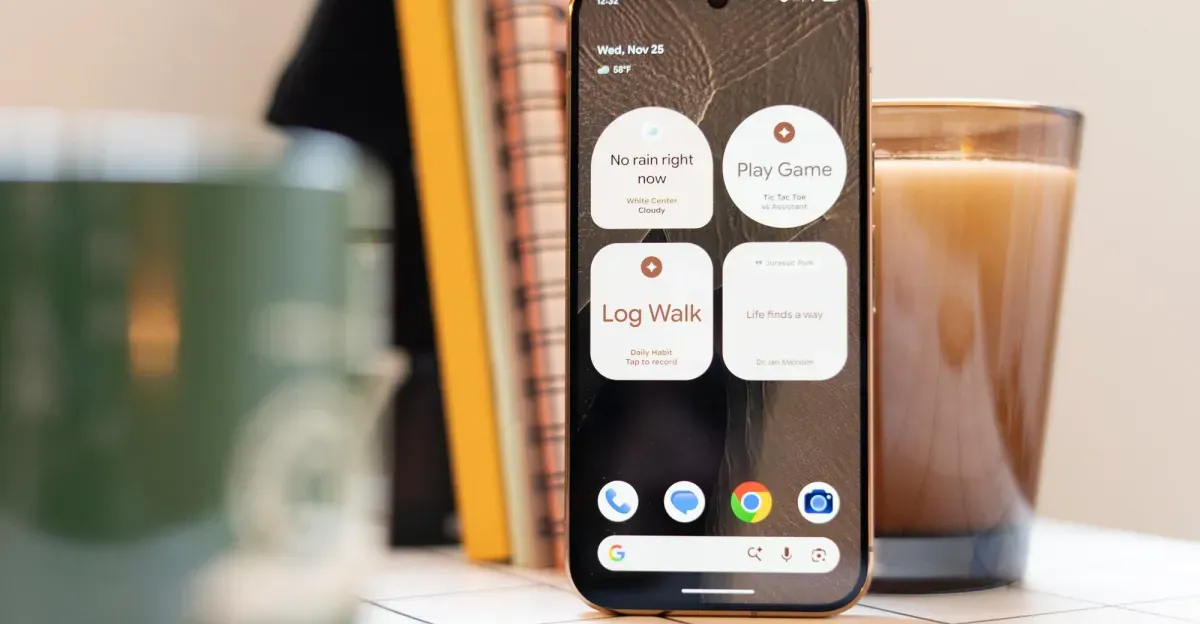
The Verge tested the feature on a Pixel 11 Pro. Most widgets were filled-in templates or tiles that open Gemini when tapped, not small custom apps. A request for real-time bus arrivals returned a wordy estimate based on the schedule. A walk-streak widget only added Calendar entries. [1]
Google announced the feature in May 2026 for release in the summer, but it arrived in November. Digital Trends reports a Play Store beta for Pixel 10 and 11 phones, excluding the Pixel 10a. The beta is English-only, limited to five countries and open only to adults, and heavier use may require a subscription. [3] [5] [6]
Widgets can draw only on Gmail, Calendar and Search, not on third-party apps. AppFunctions, a private-preview API that lets apps offer actions to the system, is a likely future route for app data. No source confirms that AppFunctions will connect to widgets. [4] [5] [7]
The widgets run on RemoteCompose, a framework under Jetpack Glance. Google describes it as resizable across phones and Wear OS, with its fuller features on Android 16 and later and a simpler fallback on older versions. No independent test has checked the resizing claim. [4]
a hands-on test found the tool filling templates rather than writing code, using only Gmail, Calendar and Search data.
Read the full assessment
Implication: until it can use live third-party app data, expect novelty and quick-glance information, not replacements for utility apps.
Executive brief
Google's AI widget builder for Android, which it promoted as "vibe coding" at its May 2026 launch, turns out in hands-on testing to produce mostly prompt shortcuts and templates rather than small custom apps. The Verge's Allison Johnson tested Create My Widget on a Pixel 11 Pro. Many of the widgets she made simply opened Gemini when tapped. A widget she built for real-time bus arrivals returned a wordy, schedule-based estimate instead (The Verge). The feature was promised for summer but reached Pixels as a beta in November. It is part of Google's "Gemini Intelligence" suite, and Google says it runs on a new rendering framework called RemoteCompose.
What changed and event timeline
Widgets announced at The Android Show
Google said users could describe a widget in plain language and Gemini would build it, starting on Galaxy and Pixel phones "this summer" ().
RemoteCompose named as the engine
Google's developer blog said RemoteCompose, the framework under Jetpack Glance, powers Create My Widget and makes the widgets resizable for phone home screens and Wear OS ().
Google announces the rollout
Google's blog said the feature was "rolling out over the next few weeks" to the Pixel 10 series and the Motorola Signature 27, with Pixel Watch to follow ().
Public beta on the Play Store
Digital Trends reported a Play Store public beta for Pixel 10 and 11 phones (not the Pixel 10a). It said the beta shipped separately because bugs surfaced during the Android 17 QPR2 rollout ().
The Verge's hands-on
The Verge found the novelty widgets fun but the practical ones weak. Many widgets were templates or shortcuts that open Gemini ().
Capabilities and access
- Product: Create My Widget, part of Gemini Intelligence. Google has not named the model version behind it.
- Devices: Pixel 10 and Pixel 11 phones (all four models in each series, excluding the Pixel 10a).
- Restrictions: Users must be 18 or older, and access is limited to certain countries and languages. Heavier use may need a subscription (Google blog).
Read the full section
- Product: Create My Widget, part of Gemini Intelligence. Google has not named the model version behind it.
- Devices: Pixel 10 and Pixel 11 phones (all four models in each series, excluding the Pixel 10a). Pixel Watch 4 and 5 are listed as coming (Digital Trends). Google's own list also includes the Motorola Signature 27 (Google blog).
- Restrictions: Users must be 18 or older, and access is limited to certain countries and languages. Heavier use may need a subscription (Google blog). The beta is English-only, in the US, UK, Canada, Australia and India (Digital Trends).
- Data sources: Gmail, Calendar and Search (Google blog). It cannot read data from third-party apps (Android Authority).
Technical analysis for researchers and developers
That looks like filling in templates more than generating code.
Read the full section
- Rendering: RemoteCompose sits under Jetpack Glance. Google describes it as adaptive and battery-efficient, with its expressive features supported on Android 16 and later; older versions get a simpler fallback (Android Developers Blog).
- What gets built: The Verge saw generated output fall into a few patterns (The Verge):
- countdowns
- sports scores
- content pulled from Search
- tiles that send a prompt to Gemini when tapped
That looks like filling in templates more than generating code.
- Integration path: Third-party data access would likely depend on AppFunctions. This is a private-preview API that lets apps offer actions to the system and its agents, in a way Google compares to MCP (Android Developers Blog). No source documents a link between AppFunctions and widgets.
- Evaluation: No published benchmarks or evaluation method.
Claims and evidence
- "No coding required" personalized widgets: a Google claim (Google blog). The Verge's single-user test found the range narrower than "mini apps."
- Fully adaptive, resizable widgets: stated by Google only (Android Developers Blog). No independent test has checked it.
- Bug-related delay: reported by Digital Trends (Digital Trends). Google has not confirmed it.
Read the full section
- "No coding required" personalized widgets: a Google claim (Google blog). The Verge's single-user test found the range narrower than "mini apps." A Jurassic Park quote widget took about 20 seconds to make, but tapping it just opened a Reddit thread (The Verge).
- Fully adaptive, resizable widgets: stated by Google only (Android Developers Blog). No independent test has checked it.
- Bug-related delay: reported by Digital Trends (Digital Trends). Google has not confirmed it.
- Independent hands-on coverage: The Verge review is the only one among the reviewed sources.
Context and prior work
- Nothing released a similar tool for building mini-apps from natural-language prompts in 2025 (TechCrunch).
- TechRadar called Create My Widget an early step toward generative UI, meaning interfaces generated on demand (TechRadar).
- The video linked from The Verge's story is a Winnie-the-Pooh clip of the line "Tut tut, it looks like rain" (00:08).
Read the full section
- Nothing released a similar tool for building mini-apps from natural-language prompts in 2025 (TechCrunch).
- TechRadar called Create My Widget an early step toward generative UI, meaning interfaces generated on demand (TechRadar).
- The video linked from The Verge's story is a Winnie-the-Pooh clip of the line "Tut tut, it looks like rain" (00:08). Johnson borrowed the line for her rain-alert widget, so the video illustrates the joke rather than the feature.
Limitations, safety and contested findings
- Real-time data: The bus-arrivals widget produced a vague, schedule-based answer instead of live arrival times (The Verge).
- Fixed actions: A "Log Walk" widget meant to track a streak only added an entry to Calendar (The Verge).
- Google's own caveat: Google tells users to "check responses" (Google blog).
Read the full section
- Real-time data: The bus-arrivals widget produced a vague, schedule-based answer instead of live arrival times (The Verge).
- Fixed actions: A "Log Walk" widget meant to track a streak only added an entry to Calendar (The Verge).
- Google's own caveat: Google tells users to "check responses" (Google blog).
- Conflicting device lists: Google's Nov 10 post lists Pixel 10 phones and a Motorola model, while Digital Trends and The Verge report Pixel 11 support too. The reports also differ on whether the feature is a beta.
Business and practitioner implications
- App developers: Users can't yet build widgets on top of your app's data.
- Widget builders: Glance code can take on RemoteCompose's newer interactions without giving up support for older Android versions.
- Product leaders: "Vibe coding" here means templates plus Gemini calls.
Read the full section
- App developers: Users can't yet build widgets on top of your app's data. AppFunctions is the likely route to being included, and an Early Access Program is open (Android Developers Blog).
- Widget builders: Glance code can take on RemoteCompose's newer interactions without giving up support for older Android versions.
- Product leaders: "Vibe coding" here means templates plus Gemini calls. Until live third-party data flows in, buyers should expect novelty and basic glanceable information rather than replacements for utility apps.
The source trail.
Sources (8)
Android’s DIY widgets are a bit of vibe-coding fun
Article text retrieved; extracted text may omit tables or interactive elements. A transcript of the video linked from this page is supplied (linked video auto captions; https://www.youtube.com/watch?v=MKreFZj3wqU); automatic text may contain errors.
theverge.comLinked video: Android’s DIY widgets are a bit of vibe-coding fun
linked video auto captions
www.youtube.com